2026 State of Document Capture & Data Extraction for AP Teams
How AP teams using QuickBooks Online capture invoices, extract key fields, match vendors and post bills, with an exceptions-first review workflow.
Scantrix Team4 min read
On this page
- Key terms: document capture, data extraction, and accuracy-first automation
- 2026 expectations for invoice ingestion: meet suppliers where they are
- What AP teams extract in 2026: the key fields that enable posting
- Vendor matching: turning extracted data into the right QuickBooks Online vendor
- Auto-posting bills to QuickBooks Online: automation with boundaries
- Exceptions-first review: the defining workflow pattern in 2026
- Where Scantrix fits in 2026 AP automation for QuickBooks Online
A 2026 snapshot of how AP teams are modernizing invoice intake and extraction inside QuickBooks Online workflows.
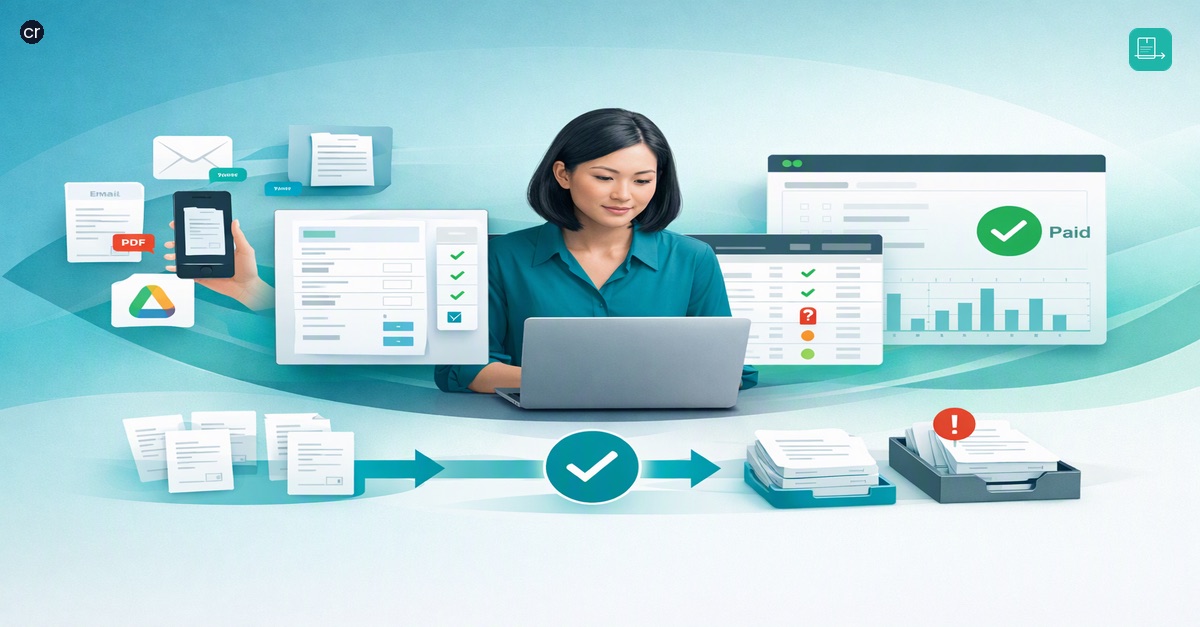
Document capture and data extraction are no longer "nice to have" for accounts payable (AP) teams working in QuickBooks Online. In 2026, the baseline expectation is that invoices can be captured from the channels suppliers actually use, converted into structured data, and turned into bills with consistent accuracy.
This state-of-the-industry overview summarizes the core capabilities AP teams typically look for when modernizing invoice processing for QuickBooks Online: invoice ingestion (email, PDF, photo, Drive), key-field extraction, vendor matching, automated bill posting, and an exceptions-first review path for low-confidence items.
Key terms: document capture, data extraction, and accuracy-first automation
Document capture is the process of bringing supplier invoices into a system from multiple sources, commonly email attachments, PDFs, photos of invoices, and cloud storage such as Drive. The goal is to reduce manual chasing of files and to create a consistent starting point for processing.
Data extraction turns the invoice image or PDF into usable fields. Instead of retyping invoice details, AP teams rely on extraction to pull key values and make them available for review and downstream posting.
Accuracy-first automation focuses on correctness and control. The hallmark of an accuracy-first approach is that when the system is uncertain about a field or a match, the invoice is routed into an exceptions-first review queue rather than being silently posted.
2026 expectations for invoice ingestion: meet suppliers where they are
AP teams using QuickBooks Online commonly need to ingest invoices through the channels that fit real supplier behavior and internal habits. In practice, "capture" typically means supporting multiple inputs in parallel:
- Email intake for invoices sent as attachments
- PDF ingestion for standard digital invoices
- Photo capture for invoices received on paper or via mobile
- Drive intake for files stored and shared through cloud folders
These inputs are not interchangeable; each creates different risks for incomplete data and formatting variation. In 2026, capture is evaluated on how reliably it normalizes these inputs into a consistent processing queue, so the same downstream steps work whether a document started as an emailed PDF or a photo.
What AP teams extract in 2026: the key fields that enable posting
Field extraction is most valuable when it maps directly to the data AP needs to create bills in QuickBooks Online. The emphasis is on identifying and extracting key fields that drive bill creation and review. While the exact field set can vary by team, the common expectation is that extracted data is presented clearly for validation, especially when confidence is low.
In an accuracy-first model, extraction is not treated as "all or nothing." Instead, every invoice becomes a set of fields that can be reviewed and corrected as needed, with attention directed to the items that are hardest to read or most ambiguous.
Vendor matching: turning extracted data into the right QuickBooks Online vendor
A practical extraction workflow includes vendor matching: connecting an invoice to the correct supplier record so that bills post to the right place in QuickBooks Online. Vendor matching is where capture and extraction become operationally meaningful. It reduces duplicate vendors, prevents misapplied bills, and saves time otherwise spent searching and selecting.
In 2026, vendor matching is commonly evaluated not just on speed, but on how it behaves when the system is unsure. When names are similar, formatting differs, or an invoice presents inconsistent supplier identifiers, modern workflows surface the ambiguity and route it for review.
Auto-posting bills to QuickBooks Online: automation with boundaries
For AP teams, the payoff of capture and extraction is the ability to post bills automatically into QuickBooks Online. Auto-posting is best understood as a controlled outcome of prior steps: an invoice is ingested, key fields are extracted, the vendor is matched, and the bill is posted.
Accuracy-first automation avoids treating auto-posting as a universal default. Instead, it distinguishes between invoices that meet confidence thresholds and those that should pause for review. This boundary is what keeps automation reliable as volume grows and supplier documents vary.
Exceptions-first review: the defining workflow pattern in 2026
The most important workflow shift is the move to exceptions-first review. Rather than reviewing every invoice line by line, AP teams focus attention where the system signals low confidence. This approach is designed to:
- Route low-confidence invoices or fields to a review queue
- Prioritize what needs human validation
- Allow straightforward invoices to proceed through automated posting
For AP teams using QuickBooks Online, exceptions-first review connects directly to daily execution. It helps ensure that capture and extraction support accuracy, while still reducing manual effort where the data is clear.
Where Scantrix fits in 2026 AP automation for QuickBooks Online
Scantrix is positioned for AP automation in QuickBooks Online with an accuracy-first workflow: ingest supplier invoices (email, PDF, photo, Drive), extract key fields, match vendors, and post bills automatically, with an exceptions-first review process for low-confidence items.